Reading the framebuffer out of RAM
Yesterday I shipped a boot splash for Rusty Nail - a little animation that plays on the ST7735 panel before the cart starts. It was a grey nail and some text, and the moment I looked at it I wanted to redo it.
There was a problem. The standalone build has no host output. The egui viewer got dropped when the console went untethered, so the panel is the only display, and nothing streams back to my Mac. To tweak the splash I was taking photos of the panel with my phone, squinting at them, changing a few pixels, reflashing, photographing again. That is a miserable loop.
So before I could redesign anything, I needed to screenshot the device. Here is how that went.
Dead end: the ST-LINK's serial port
The first idea was to send the framebuffer to the host myself. The Nucleo's ST-LINK
exposes a virtual COM port (USART3 on PD8/PD9), so I added a screenshot cargo
feature: a task that, on a trigger byte from the host, dumps PICO_FB - the 128x128
8bpp framebuffer - out the serial port. The host script pokes it with an s and reads
back the reply.
The s arrived at the firmware about a hundred and seventy seconds later.
175.883522 [INFO ] screenshot: usart3 rx 0x73
175.883525 [INFO ] screenshot: poke received, dumping frame
That 0x73 is the s. The ST-LINK's VCP buffers host-to-target bytes and delivers
them in its own time - minutes, in this case. And when the firmware did dump its 16KB
reply, only the 8-byte header made it back; the bulk data vanished somewhere in the
bridge. That VCP is built for low-rate console text, not low-latency triggers or bulk
transfer. I reverted the whole firmware feature.
The actual answer: just read the RAM
The better idea needed no firmware at all. PICO_FB is a plain array in DTCM at a
fixed address (0x20000000). The debugger can read target RAM directly:
probe-rs read b8 0x20000000 16384 --output shot.binSixteen kilobytes straight out of the chip's memory over SWD: no serial, no trigger, no firmware support. Decode each byte through the PICO-8 palette, write a PNG. It worked on the first try and pulled a live frame off the running cart. The firmware never knows it happened.
The tearing
There was one catch. The read is not synced to anything. The cart clears and redraws
PICO_FB sixty times a second, and a 16KB SWD read takes long enough to span more
than one of those redraws. So a full-screen animating frame comes back banded - the
top rows from one frame, the bottom from the next, with a smear of half-drawn pixels
in between. For a still screen it is fine. For a moving cart it looks like bad VHS
tracking.
Dead end: halting the core
The textbook fix is to halt the CPU, read a settled frame, then resume. probe-rs read cannot halt, but probe-rs ships a GDB server, and gdb can. So: start probe-rs gdb, connect arm-none-eabi-gdb, interrupt, dump binary memory, detach.
It worked exactly once - one clean, tear-free cart frame. Then it turned on me. On
this particular ST-LINK V3 the gdb path became a catalogue of failures: connection
timeouts, Cannot access memory at address 0x20000000 (gdb refusing to read an
address outside its memory map; set mem inaccessible-by-default off fixed that one),
The program is not being run. Worst of all, a failed attempt would leave the core
halted, so the panel froze and I had to recover it with a reflash. Four or five tries
in, I gave up on the halt and shipped the plain SWD read, with an honest note in the
tool's header that animated scenes can tear. A reliable tool that is sometimes
imperfect beats a perfect tool that wedges the device.
The trick that made the splash clean anyway
Here is the nice part. The splash does not move - it is a static card. The reason the
screenshot tore was that boot_splash was redrawing the entire frame, dither and
window and text, every single tick. So the read always landed mid-paint.
The fix was to stop doing that:
// Draw the static splash ONCE. No per-frame redraw, so a raw screenshot read can
// never catch a half-painted frame. Then hold: bump PICO_FRAME_SEQ so the panel
// mirrors the (unchanging) settled frame.
if let Some(mut s) = unsafe { Framebuffer::new(128, 128, &mut *addr_of_mut!(PICO_FB)) } {
    // ... dither, window card, wordmark, text ...
}
for _ in 0..FRAMES {
    PICO_FRAME_SEQ.fetch_add(1, core::sync::atomic::Ordering::Release);
    Timer::after_millis(16).await;
}
Draw it once, then idle. The framebuffer is static, the screenshot is pixel-perfect, and it is cheaper anyway - there was never any reason to repaint a still screen sixty times a second.
Now I could see it, so I could fix it
With a working screenshot loop, the redesign was quick.
The old splash used the PICO-8 cart font (font_p8), which has a quirk: its lowercase
letters are drawn shorter than the uppercase, and the lowercase o starts a pixel row
lower. At this size the two os in "booting" looked uneven and slightly wrong, and I
could not work out why until I read the glyph table. The desktop chrome font
(fcgfx::font) has proper even lowercase, so that was the first swap.
Then the look. Rusty Nail already has a Picotron-style desktop: a teal dithered background, pink and purple window title bars, parchment window bodies. The splash should look like the prelude to that, not a separate boot screen. So: a teal ordered-dither field, a centred window card with a pink title bar, the wordmark and a little cartridge icon in the title, version and status on the parchment body.
One thing got in the way. The panel renders the cart framebuffer through the PICO-8
16-colour palette, and it had no idea what "teal" or "parchment" were - those are
desktop colours that live at completely different palette indices. Writing a desktop
colour into PICO_FB just produced the wrong PICO-8 colour.
The fix was to widen the panel's colour table from 16 entries to 32:
// 0..15 stay PICO-8 (carts, untouched); 16.. carry the desktop role colours
// (teal dither, parchment, pink, ...) mirroring fcgfx::palette::ROLES.
out[16] = rgb565_raw([40, 170, 150]); // TEAL_LIGHT
out[17] = rgb565_raw([20, 120, 105]); // TEAL_DARK
out[18] = rgb565_raw([240, 230, 210]); // BODY (parchment)
out[19] = rgb565_raw([240, 120, 170]); // PINK (title bar)
Carts still write 0-15 and get PICO-8. The splash writes 19 and gets real Picotron pink. Two palettes in one framebuffer, picked apart by index range.
Here is the result, captured by the very tool I built to see it:
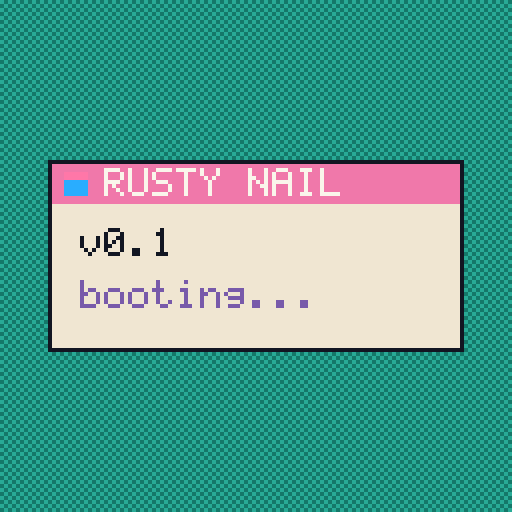
A teal-dithered window card, a pink title bar with the wordmark and a cartridge icon, a parchment body, the desktop font. It reads like the machine waking up into its own desktop, which is what I was after. And every pixel of that screenshot came out of the chip's RAM over a four-wire debug cable, because the thing it is a picture of has no other way to show me what it looks like.
That is also why these posts are stills. Once the DVI board arrives the console gets a real video output, and these posts get video instead of one framebuffer at a time.