Part 2 of 13 in Ghostveil
Turnstiles that turn the way you push
Ghostveil's turnstiles turn the way you push them, and come in shapes you can see turning.
The turnstile from the first night had two problems. It only ever turned clockwise, whichever side you pushed it from, and because it was a plus, a quarter turn put an arm back on every square an arm had just left, so you couldn't see it move. Over the next week I fixed both.
Each turnstile now has an orange pivot you can't walk onto, and I can put brown arms on any of its four sides. Here are two: an L with arms above and to the left of the pivot, and the cross:
Turnstile(Vector2(10, 5), [Vector2(-1, 0), Vector2(0, -1)]),
Turnstile(Vector2(18, 9), [
  Vector2(0, -1),
  Vector2(0, 1),
  Vector2(-1, 0),
  Vector2(1, 0),
]), // Cross +
I made a 20 by 15 test board with four L turnstiles, four T turnstiles, the cross and a short wall, and wrote every square's coordinates on it.
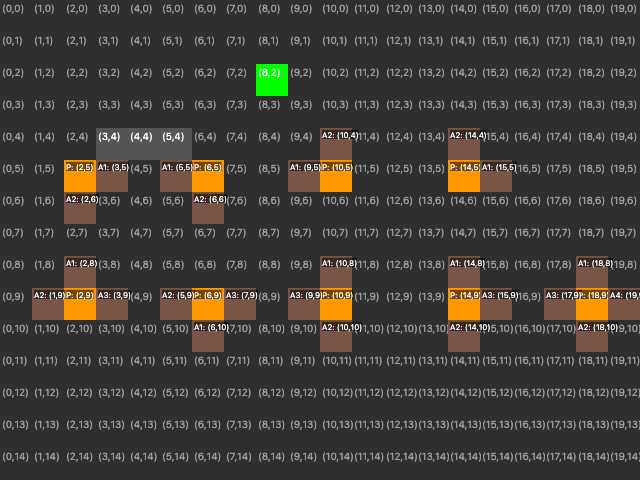
I'm the green square.
Which way it turns
The rule I wanted is that the arm you push moves the way you push it. In the code that's a small table:
final rel = _getArmGridPos(pushedArm) - pivotGrid;

final isClockwise = switch (pushDirection) {
  "up" => rel.x < 0,
  "down" => rel.x > 0,
  "left" => rel.y > 0,
  "right" => rel.y < 0,
  _ => true,
};
Those four cases match the sign of a cross product. Call the pushed arm's offset from the pivot and the direction of the push ; the two-dimensional cross product is the same sum that gives the turn of a push on a door:
Here and are how far the pushed arm sits across from the pivot and below it, and are the push's step across and down, and (tau) is the result. With counting down the screen, means clockwise and means anticlockwise. Pushing the top arm of an L to the right gives and , so and the arms turn clockwise. Push the same arm to the left and :
Once the direction is known, each arm's offset turns through a quarter, one way or the other:
final rotated =
    isClockwise ? Vector2(-rel.y, rel.x) : Vector2(rel.y, -rel.x);
A push moves you two squares, through where the arm was and out the other side. If the landing square is the pivot or another arm, nothing moves. The turn also fails if an arm would land on a wall or on the player. Here's the L in the middle of the top row, in the game: a push to the right turns the L clockwise, a push straight back turns it back again, and a push down on its other arm turns it anticlockwise.
The square you land on never gets checked for walls. The L beside the wall turns clockwise when I push its left arm up from below, and that drops me on top of the wall.