A Home screen for ClutchOS
Clutch Cargo turns the MIB2 head unit in my Volkswagen Scirocco into a games machine: QNX 6.5 on an i.MX6 Cortex-A9, an 800 by 480 dashboard panel, an ES-DE frontend I cross-compiled for it, and an 8BitDo SN30 Pro paired to a Mayflash MAGIC-NS Lite in the head unit's USB-A socket, which presents it as a Switch Pro Controller. Since the core sweep, ClutchOS has moved out of the factory menus. A small supervisor now runs as its own service, started by the unit's service manager at boot and outside the process tree of the factory HMI. Beside it sits a pad watcher: hold HOME on the controller for a second and a half and ES-DE starts, with no trip through the factory menus.
That hold went straight into the games. I wanted it to open a screen of apps instead, because ES-DE is one thing ClutchOS will run and I expect others (trip data, something for the car itself). The look came from the Canvas family of ES-DE themes: flat tiles, one bright highlight, big type. I drew four candidate layouts at the panel's exact size and liked all four, so all four stayed, and choosing between them became the first thing Settings does.
Drawing without the GPU
ES-DE draws through EGL and GLES2, while the Home screen sets its pixels directly. The pad watcher already puts a small badge on screen by opening a QNX Screen window with a writable buffer and setting pixels in it, and that path had run on the car many times. A shader and a texture upload would have been extra machinery for filling rectangles.
The first cut took the two bitmap faces from the ESP32-P4 panel in the car, a 7 by 9 face for titles and a 5 by 7 face for everything else, drawn at whole-number scales, plus six 16 by 16 icons I drew as strings of # and .. On the panel's 720 pixel strip that type belongs. Rendered at 800 by 480 and put beside the factory HMI it looked like a calculator, and the icons were worse: a gamepad that read as a bone, a steering wheel that read as a tap. It lasted one evening.
The replacement keeps the software renderer and changes what it draws. Type is JetBrains Mono, the face my other projects already use on their phone screens, in four faces at fixed pixel sizes: bold 40 for the big names, semibold 22 for tile names and values, regular 18 for detail lines, and a tracked semibold 13 for the status row and hints. I tried Inter first and it looked like every other app; the monospace ties the dashboard to the rest of the kit. Icons are Lucide, the 2 pixel stroke set, at 96, 64, 48 and 24 pixels. A generator rasterises every printable ASCII character of each face with FreeType and every icon with librsvg into 8 bit coverage masks, and writes the lot into a C header. Names now come out in title case and detail lines in sentence case; only the small labels stay in capitals.
Blending a mask onto the frame has to work without a divide, for a reason the next section gets to. With a the coverage byte, each channel becomes dst + (((src - dst) * a256) >> 8) where a256 is a + (a >> 7), so full coverage lands exactly on the source colour and everything in between is a multiply and a shift.
Tiles have 8 pixel corners. A corner is a table of how far each of the top eight rows starts in from the edge, a quarter circle rounded to whole pixels, with the pixel just outside each row blended part way so the curve reads as a curve:
static const uint8_t CORNER[8] = { 5, 3, 2, 1, 1, 0, 0, 0 };I first drew the green "pad connected" dot with the same tile function. An 8 pixel square with 8 pixel corners cut out of it is a triangle, and the first renders had a small triangle where the dot should be. The dot now has its own table.
The four layouts
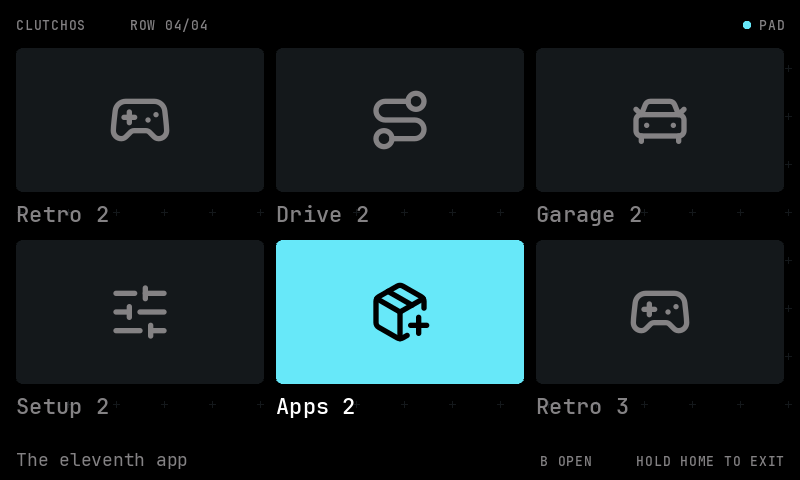
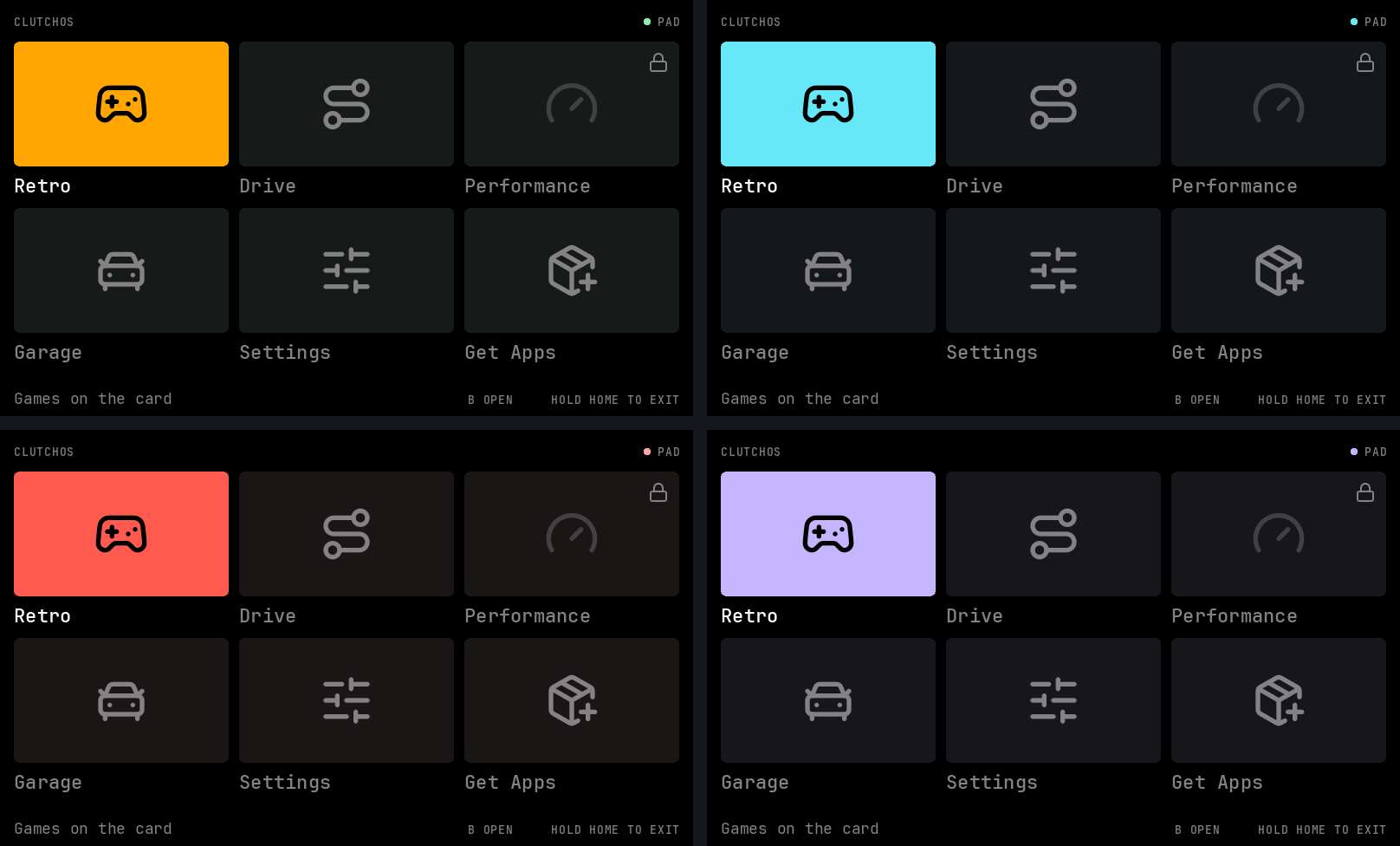
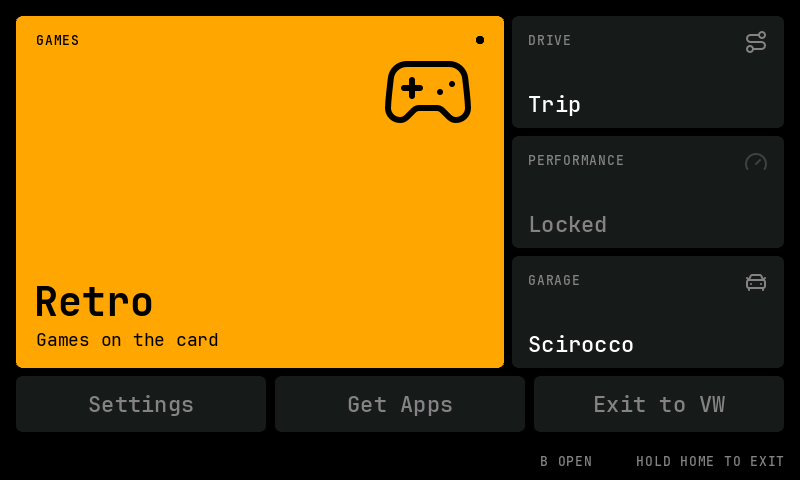
These are offscreen renders of the drawing code, written straight from the frame buffer at 800 by 480. The app list is the one from the design sketches. Drive, Performance, Garage and Get Apps do not exist yet, and the unit does not list them.
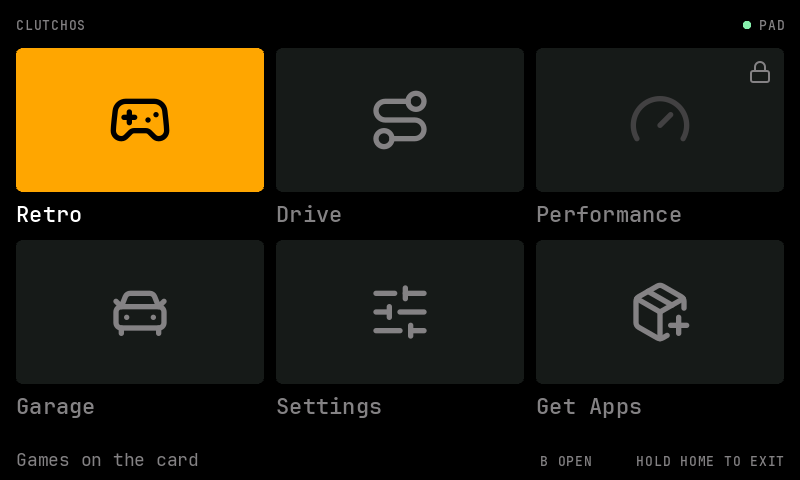
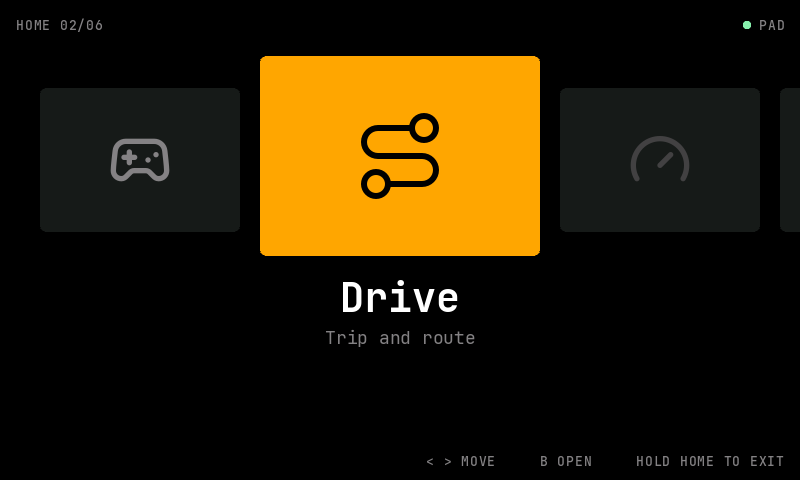
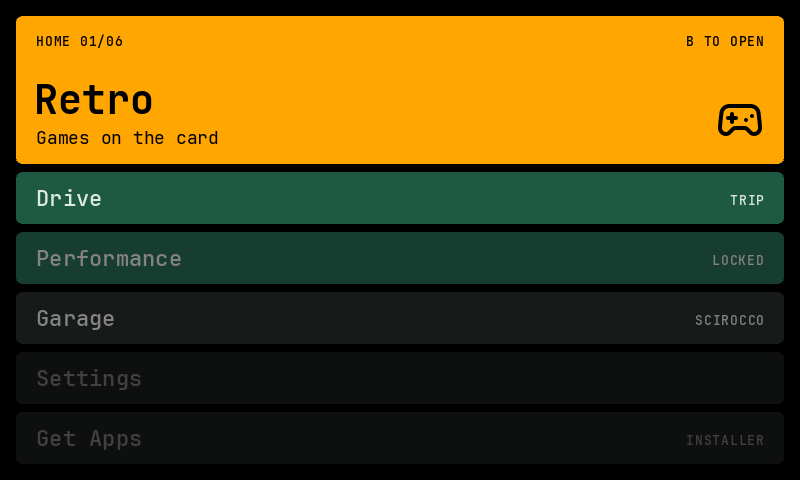
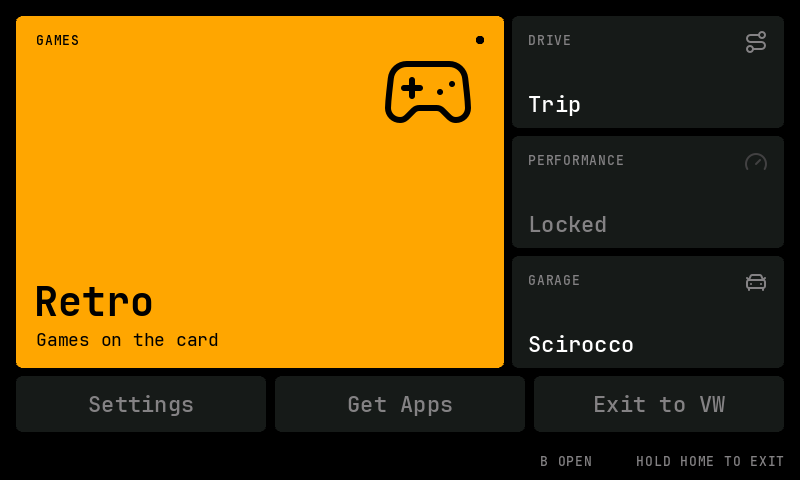
The launcher stack is the panel's own "layer" view carried across: every row stays on screen, the focused card takes whatever height the collapsed rows leave, and a row's colour steps down with its distance from the focus, in four flat tiers with no gradient. The bento is the only layout with an explicit exit on screen. In the others, holding HOME again goes back to the VW screen, and a bar fills along the bottom while it is held so the hold does not look like a hang.
Each layout keeps its own navigation rules. The grid moves in three columns, and pressing down onto a short last row lands on its last app. The carousel moves left and right, the launcher up and down. The bento goes from the big tile to the side column to the pill row and back, with the pill row scrolling through every app from the fifth on. With more than six apps, the grid scrolls by rows and the launcher by a window that keeps two rows above the focus where it can.
Settings
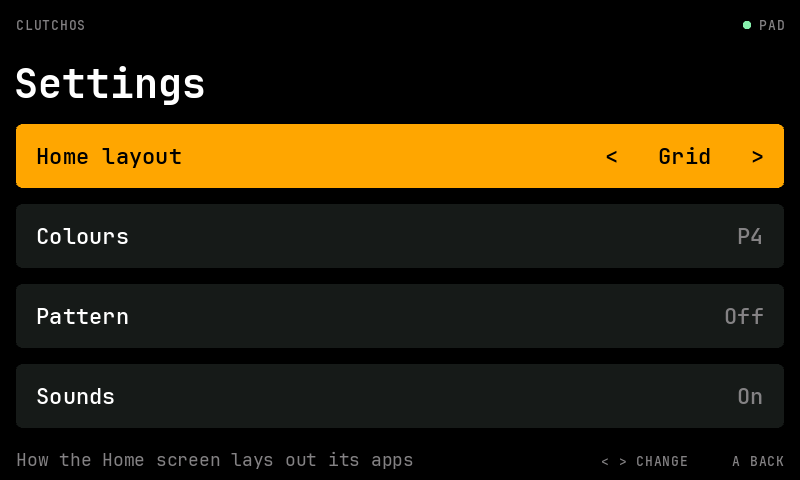
Settings has four rows: the layout, the colours, the background pattern and the sounds. Left and right change the focused row at once and the choice is written straight away, so the screen behind the list is always the saved state. Back returns to the Settings tile in whichever layout is now chosen.
The first palette is the panel's: black ground, dark grey tiles, deep green for the hero tiers, amber for focus. The other three change the hue of the highlight, the hero tiers and the dot and keep the panel's greys, so the hierarchy reads the same in each. The highlight always carries black text, which rules out any highlight colour too dark for it.
The choice lives in a three-line text file on the unit's writable partition:
layout=bento
palette=ice
pattern=on
It is written to a .new file and renamed over the old one, so a power cut leaves one complete version or the other. The parser takes each line on its own. An unknown key is skipped, an unknown value leaves that setting at its default, and a file with a mangled layout line still keeps its palette. An older build reading a newer file behaves the same way.
The build that refuses division
The head unit programs are compiled freestanding with a GCC 9.3 cross compiler and linked against link views taken from the unit's own shared libraries. After linking, a verifier reads the binary's symbol table and refuses the build if it imports any compiler division helper beyond __aeabi_uldivmod, the one the USB pad reader uses to turn a clock reading into milliseconds.
Settings wraps around: right from the last layout goes back to the first. My first version wrote that as (layout + dx + count) % count, and since the palette count is a variable, the compiler would have called __aeabi_idivmod for it. The unit's libc does export that helper, and the build refuses it anyway, because each exception is meant to be written down with its reason. The wrap became a comparison, and the blend above is shifts for the same reason. Divisions by a constant 2 for centring text compile to shifts and stay. The unit build of cc-home comes out at 307,276 bytes, nearly all of it the glyph and icon masks; the pixel-face version was 37,036. It now links the same audio-path libraries the game hosts do, for the three calls that reach the chime lane.
Handing over to ES-DE and back
The supervisor is a ksh script, and the program talks to it through files in the unit's RAM file system. Home writes its choice to a result file and the supervisor reads it:
case "$result" in
"launch RETRO")
	log "home launch RETRO"
	run_start 0
	home_stop "$hpid";;
exit)
	home_stop "$hpid"
	log "home exit to VW"
	return;;
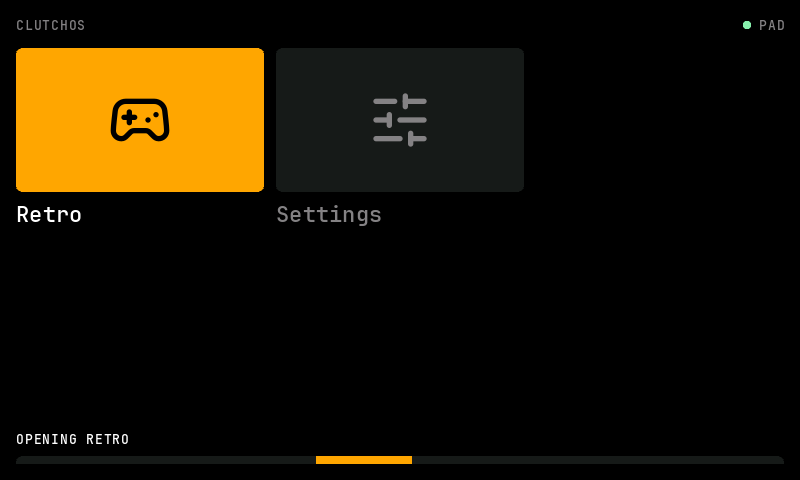
After writing launch RETRO, Home releases the pad so ES-DE can claim it, keeps its window up, and replaces its bottom rows with a sliding bar. It watches the ES-DE session log for the line ES-DE writes when its views are built, and closes when that line appears. The first two frames repaint the whole screen, one per buffer, and after that only the strip with the bar changes, so a full-screen redraw every 40 milliseconds is not competing with ES-DE while it loads. When the session ends, the supervisor starts Home again.
Two things went wrong on paper before any of this ran.
Before each start, the supervisor clears whatever a crashed session left behind, but only when no ES-DE process is alive, which it decides by matching process command lines against the session log's file name. The pad watcher is passed that file name, so it was already excluded by name. Home is passed it too, so it can watch for ES-DE being ready. Left alone, a running Home would have looked like a live session, so after any session that died uncleanly the clean-up would never run and every later start from Home would refuse. I excluded cc-home by name the same way and wrote a test with a fake process list. Then I took the exclusion back out to check the test failed without it, which it did.
The second was input. When you leave ES-DE by holding HOME, the button is often still down when Home appears, and the button that confirmed a menu item may be too. The key repeater ignores anything already held on its first reading until it has been released once. My first version cleared those keys from the fresh-press check but still let a held direction start auto-repeating after 350 milliseconds, so a thumb resting on the D-pad would have scrolled Home by itself. The muted keys now sit in their own mask, and repeats come only from keys pressed since Home opened.
Motion, ported from Flutter
The first build cut between states. Focus jumped, layouts switched in a frame, and the only things that moved were the two bars. I wanted the motion the panel has, so I ported the part of Flutter's animation library that gives it: the curves, the controller and the tweens.
Flutter's Cubic curve does not evaluate a bezier at t. It bisects on the curve's parameter until the x estimate is within 0.001 of t, then evaluates y there. The port does the same in 16.16 fixed point, where 0.001 is 66, with the seven cubics I use (ease, easeIn, easeOut, easeInOut, fastOutSlowIn, easeOutCubic, easeInOutCubic) plus linear and decelerate. A float port of the Dart code produces the reference values and the test requires the fixed-point ones within 0.003 of them at nine points on each curve. The controller is the AnimationController idea: forward or reverse over a duration, with a run that interrupts another starting from where that one had got to. Progress as a fraction of the duration would be a divide, so it is a bisection on the multiplication instead.
Each layout now draws from the tween of two geometries. A geometry is what the layout would draw for one focus: for the grid, the scroll and the highlight rectangle; for the launcher, every row's top, height and colour; for the carousel, a continuous position along the row of slots; for the bento and for Settings, the highlight rectangle. A move is 180 milliseconds on fastOutSlowIn between the geometry for the old focus and the one for the new, so the grid's highlight slides and its rows scroll, the carousel slides every tile one slot along with the centre one growing, the launcher's rows grow and shrink with their colours running through the tiers, and the bento's highlight morphs from the big tile to a side tile to a pill. Text follows the highlight: an item is lit while the moving rectangle covers its centre. Home fades in from black over 220 milliseconds, a switch to Settings over 140, and out over 150 before the VW screen comes back.
The motion is time based rather than frame based. While anything moves the program draws a frame every loop and posts it, and Screen's double buffer paces that to the display, so the rate is whatever the Cortex-A9 allows and a move takes the same 180 milliseconds at 60 frames per second or at 20. Each move writes its frame count and length to the log, which is how I will find out which of those it is.
That clip is the real drawing code played through a scripted pad session with a synthetic 60 frames per second clock, written frame by frame and encoded. It is what the unit would show if it keeps up. Two things came out of watching it. Two lines of different lengths crossfading on top of each other, the old detail line and the new, read as a jumble for a few frames, so those fades are now sequential: the old line goes out over the first half of the move and the new one comes in over the second. And my first tests assumed the highlight would be half way across at half time, which fastOutSlowIn never does; at half time it is about three quarters of the way there.
Sounds, on the chime lane
A screen that moves and says nothing feels broken, so Home now ticks. The question was where the sound could go. The games take the entertainment source (the media input, connection 20 in the unit's audio table) when they start, and the radio goes quiet until they hand it back. Home opening and closing several times a drive with the radio dropping out each time would be unbearable. The factory screens click over whatever is playing, which means the unit has a path that mixes rather than switches, and I found it on the audio day: the nav chime lane, mono2, on an announcement sink the amplifier mixes over the entertainment sink. Three test tones went down it on 22nd September with the radio on, and the radio neither stopped, faded nor paused. That is the path.
The sounds are made on the spot rather than stored: sine tones through a 256-entry table with a fast attack and a decay that falls as the square of the remaining time, which sounds like something struck rather than a beep. Every attack and length is a power of two, so each gain is a shift, and the phase increments are constants the compiler folds. A focus move is a 21 millisecond tick at 2.4 kHz. A setting change is a 43 millisecond tick at 1.8 kHz. Select is two rising notes, back two falling ones, a locked app a low dull tick at 300 Hz. Home opens on a soft fifth (660 and 990 Hz) swelling over 170 milliseconds and leaves on the same fifth falling away. Peaks stay under 2000 of a possible 32767, a little under the test tones.
The service takes 960 byte blocks, ten milliseconds each, and blocks a send when its ring of 16,384 bytes is full. The pump keeps only 50 milliseconds queued ahead of playback, so a send never waits, a sound starts within about 50 milliseconds, and the frame loop that is drawing the animation is not held up. Three refused sends in a row switch sound off for the session. Settings gained a fourth row for it.
Removing a word
The bento sketch had RESUME across its big tile, borrowed from the reference themes, where it returns to the last game played. Nothing in ClutchOS resumes a game. B on that tile starts ES-DE, so the word promised a feature that was not there. The tile now carries the app's name.
The Home hints lost "A BACK" for a similar reason, since Back does nothing on Home itself. Settings, where it does something, still shows it. The word LOCKED on a tile went the same way and became a padlock.
What is tested, and what is not
On the Mac, a C test harness checks the theme file round trip and its damage handling, every layout's navigation, scrolling, the key repeater, the Settings flow, parsing of the app list, the curves against Flutter's values, the controller's timing and reversal, frames part way through a move in each layout, every sound's length and peak and the silence at its ends, and the pump against a fake service that counts blocks and can refuse. It also samples pixels where each layout promises a colour, and draws every layout at every app count and focus position under AddressSanitizer and UBSan with a sentinel row past the end of the buffer, which stays untouched. Six supervisor tests run a fake cc-home through a hold, a Retro launch, the return to Home and the exit, then through a Home that fails to start, an app with nothing to launch it, and a Home still running when a crashed session needs clearing.
None of it has run on the head unit. The pad watcher's badge only ever wrote grey pixels, where red, green and blue are equal and byte order cannot show, and every earlier colour test went through GLES. So how the unit's RGBA8888 Screen buffers order their bytes in memory has never been observed here. The program writes blue first, the usual little-endian reading, and a one-word file on the unit flips it at the next start if amber comes up as blue. How long a full frame of blended glyphs takes on the Cortex-A9 is unmeasured, and with motion that number decides whether a move is smooth or a slideshow; the first frame's draw time goes to the log too. I also expect the VW screen to show for about a second between ES-DE closing and Home coming back. How loud the ticks are against the radio is unmeasured too; the test tones were heard, and that is all anyone wrote down.
The unit's Home will list Retro and Settings, with Retro locked and marked No card when the games card is not in. Later apps register with a one-line file each, in the same id|name|value|detail|flags format the supervisor already writes. The next step is to ship it to the unit as the next release and hold HOME in the car to see whether the highlight is amber.